iPad, Mac, and Windows browsers
Authorized staff open the clinic's secure LocalChart address. Client devices do not carry a separate model or record store.
Clinic-controlled by design
A plain-language map of what stays inside the clinic, what limited business information may leave, and how LocalChart works when an encounter is not recorded.
Authorized staff open the clinic's secure LocalChart address. Client devices do not carry a separate model or record store.
The application, encrypted clinical records, local transcription, drafting, recovery, and backups stay under clinic control.
The clinic controls who may connect remotely and can revoke the private route.
Account, license, subscription, and clinic-address metadata may leave the clinic. No patient information belongs in this path.
Patient profiles, schedules, recordings, transcripts, drafts, approved reports, audit evidence, backups, and recovery artifacts are stored on clinic-controlled systems according to the clinic's configuration.
Clinic identity, staff account membership, licensing, installation status, subscription references, and security events may be handled by the account service. It is not intended to receive patient names, appointments, recordings, transcripts, or reports.
Normal support should use PHI-free diagnostics and fictional examples. Remote access is clinic-controlled and revocable; it is not standing vendor access to patient records.
Data custody without forced replacement
LocalChart keeps the clinical core under clinic control and can also operate as a documentation layer beside an existing EMR. The clinic can retain original sources and a readable longitudinal archive while sending only the clinician-approved document into another system.
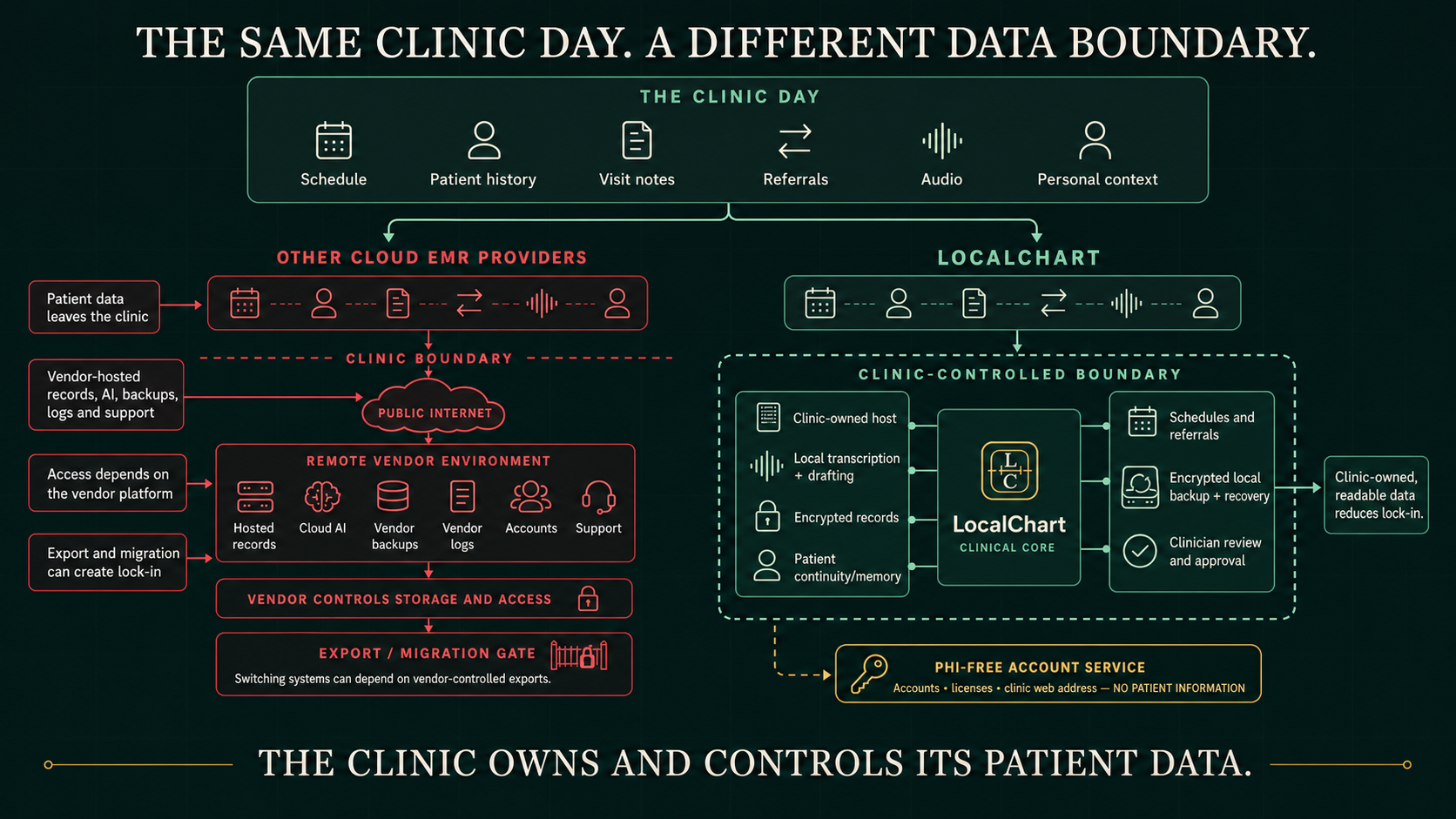
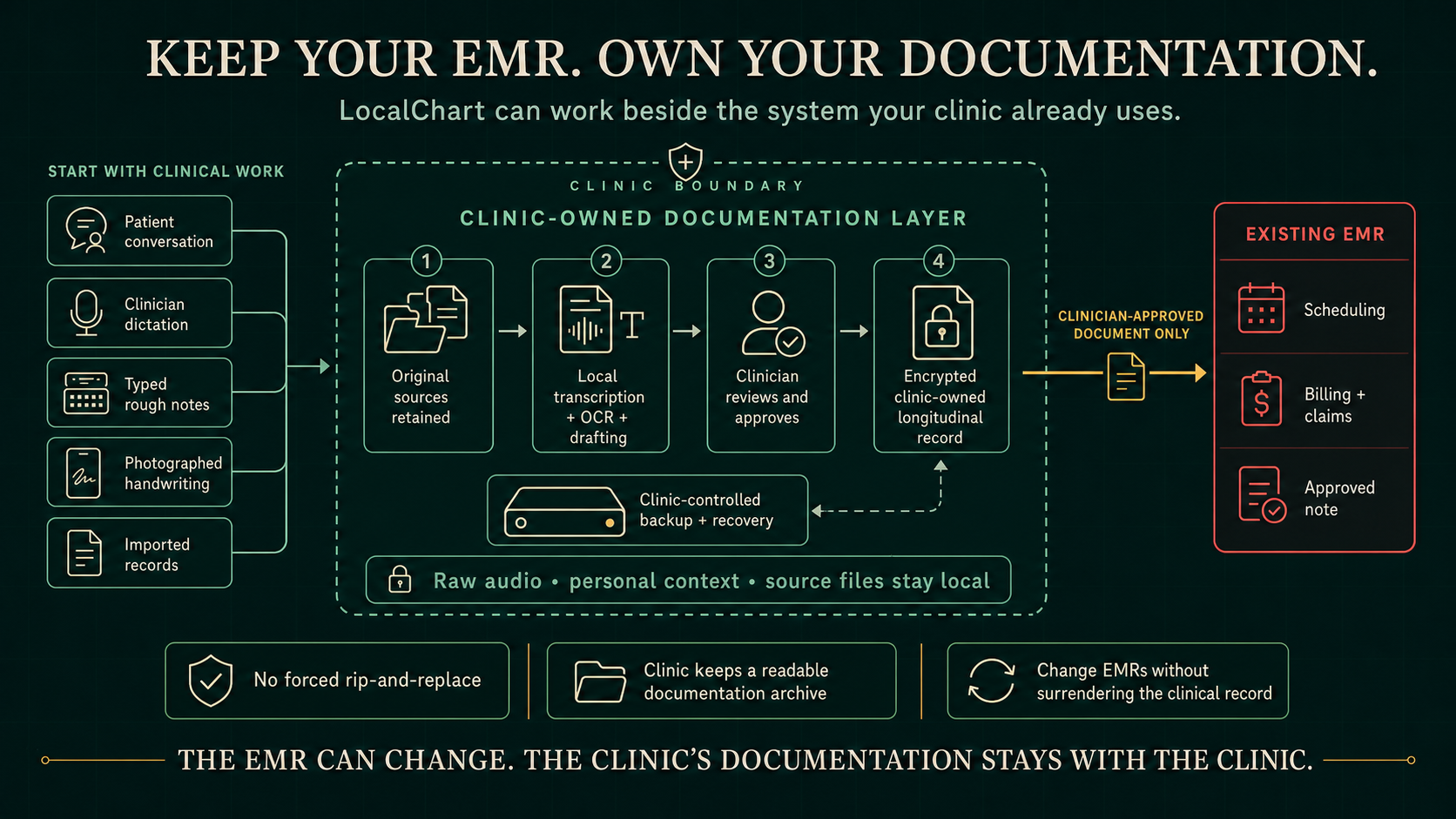
Cloud architecture, contract terms, export rights, and data-custody rules vary by vendor. Clinics should review each vendor's terms. LocalChart's intended distinction is a clinic-controlled clinical workspace with a PHI-free account-service boundary and a clinician-approved handoff to an existing EMR when required.
LocalChart's supported transcription and language-model workflow runs on the clinic host. Clinical recordings, transcripts, prompts, and draft notes are not sent to a cloud LLM for drafting. Optional PHI-free services for accounts, licensing, and route coordination remain outside the clinical data path.
A clinic may use encounter recording only after following its consent and authorization requirements. If consent is not obtained, do not record the conversation. LocalChart still supports provider dictation: the clinician dictates their own clinical summary, LocalChart transcribes it, and the normal drafting, review, record, and export workflow continues.
LocalChart protects supported stored artifacts and provides authorized in-app reading, export, backup, and staged recovery. Clinics should not depend on navigating encrypted application files directly. Export and recovery tools are the supported way to keep records usable and auditable.
LocalChart combines private HTTPS access, named profiles and role boundaries, device identity, protected storage, audit and recovery evidence, exact runtime and model identification, bounded document processing, dependency review, and release rollback. Imported files, OCR text, recordings, and model output are treated as untrusted inputs rather than instructions with authority.
Separate security gates exercise prompt injection, attempted instruction and prompt extraction, data leakage, malicious document and OCR content, adversarial audio, cross-patient isolation, resource exhaustion, and runtime containment. These controls reduce risk; no software or model can promise immunity from every attack.
Audio and source records preserve provenance. Transcripts, extracted facts, summaries, and generated notes remain drafts until an authorized clinician reviews and approves them. LocalChart does not silently finalize clinical output.
Billing or licensing status may pause creation of new work. Authorized staff retain access to existing clinic records, exports, backups, audit history, and recovery.
Local hosting does not automatically satisfy HIPAA, state recording laws, professional-board rules, payer requirements, or clinic policy. Each clinic still needs appropriate risk analysis, workforce practices, device and network security, consent procedures, retention rules, and legal review.
Contact support@localchart.app with a PHI-free description. Do not email patient information, credentials, or backup files.